 OpenAny Blog
Let Your Coding Agent Find Real Customer Leads on X
Disclosure: this post is written by the OpenAny team, and the example product is OpenAny itself. Every number below comes from a real run on 2026-11-14.
Short answer: give your coding agent two things, an X search API and a model, and a short Python script (under 100 lines). The search pulls recent posts where people ask for recommendations or complain about their current setup. The model scores each post for genuine buying intent and suggests how to reply. On our run, five searches and one model call turned 62 raw posts into 6 leads worth replying to, in under two minutes, for $0.0157 in total.
The problem: three vendors before you find one customer
Founders and indie developers know the best leads are people already asking for what you sell: "where should I buy model tokens?", "anyone else drowning in API keys?". Those posts are public on X, but catching them yourself usually means:
- an X API plan, or a scraper you maintain,
- an LLM provider to separate real buyers from noise,
- often a third service for web search or enrichment,
- and a key, a contract and a bill for each one.
That's a lot of setup for an experiment that may or may not find you anyone. This post shows the one-key version: the X search and the model call run on the same OpenAny key and draw from the same prepaid balance.
Setup (about 3 minutes)
- Create an OpenAny account and an API key at openany.si. Creating the account and key is free, but calls are paid from prepaid credits, so add a small top-up first (card, USDC or x402). There is no subscription and no free call allowance.
- Put the key in your environment, never in a prompt:
bash
   export OPENANY_API_KEY=...   # from the API keys page
   pip install openai requests
- Optional, for Claude Code, Cursor or Codex: save the OpenAny skill where your client looks for it (
.claude/skills/openany/SKILL.md,.cursor/skills/openany/SKILL.mdor.agents/skills/openany/SKILL.md; the file is athttps://openany.si/SKILL.md, read it before installing). Then install the CLI (Node.js 22+) and runopenany setup --scenario callin your own terminal. With the skill installed, the agent candiscoverandinspectAPIs and show you the price before it calls anything.
You can browse what's available without a key:
npm install -g openany-cli@latest --registry=https://registry.npmjs.org/
openany discover -q "twitter search" -l 10 --public -j
We used the X / Twitter Search listing from provider anyapi. It takes X advanced-search syntax (OR, quotes, since:, lang:, -filter:links) and returns structured posts. When we ran it, each successful search was charged 600 micro-USD ($0.0006), reported in the response's openany_cost field. Check the API catalog for the current price before you run anything, because prices can change.
Step 1: Search X for people asking, not people selling
The hard part is the query, not the code. Our first attempt, "openrouter alternative", returned five posts, and all five were vendors promoting their own gateways. People rarely ask with your marketing words. They ask the way they talk:
- "where should I buy tokens", "anyone using…", "recommend"
- "so many API keys", "too many API keys"
- "give my agent…", "tools for my agent"
- "which provider" next to a model name they already use
Here are the five queries that worked for OpenAny, with the call that runs them:
import os, requests

KEY = os.environ["OPENANY_API_KEY"]
BASE = "https://api.openany.si/v1"
SINCE = "2026-10-25"

QUERIES = [
    'openrouter ("looking for" OR "anyone using" OR recommend OR "where should i" OR "instead of")',
    '("so many api keys" OR "too many api keys" OR "juggling api keys")',
    '("give my agent" OR "api for my agent" OR "tools for my agent") -filter:links',
    '("deepseek api" OR "kimi api" OR "glm api") (cheapest OR "which provider" OR recommend OR "where to")',
    '(tavily OR serper OR "brave search api") (alternative OR expensive OR "what do you use" OR recommend) -filter:links',
]

def x_search(query: str) -> list[dict]:
    r = requests.post(
        f"{BASE}/agent-apis/anyapi/v1/run/twitter.search",
        headers={"Authorization": f"Bearer {KEY}"},
        json={"query": f"{query} lang:en since:{SINCE}", "queryType": "Latest", "limit": 20},
        timeout=60,
    )
    body = r.json()
    if r.status_code != 200:
        raise RuntimeError(f"{r.status_code} {body.get('code')} {body.get('message')}")
    print(f"{len(body['output']['data']['items'])} posts, openany_cost={body.get('openany_cost')}")
    return body["output"]["data"]["items"]
Each item comes back with id, url, text, createdUtc, authorUsername, isReply and engagement counts. Two details from the listing's schema matter: bare words are ANDed, so join alternatives with OR, and wrap an OR list in parentheses when an operator follows it.
The five searches returned 62 posts. A cheap prefilter then dropped duplicates, posts with links (on X those are mostly promos and news) and hashtag-heavy posts, which left 44 for the model:
def prefilter(posts):
    seen, out = set(), []
    for p in posts:
        t = p["text"]
        if p["id"] in seen or "t.co/" in t or t.count("#") >= 3:
            continue
        seen.add(p["id"])
        out.append({"id": p["id"], "url": p["url"], "author": p["authorUsername"],
                    "is_reply": p.get("isReply", False), "text": t[:600]})
    return out
Step 2: Let a model score buying intent
The model endpoint on the same gateway is OpenAI-compatible, so the official openai package works with a changed base_url. We used deepseek-v4-flash. Copy a current model ID from the model catalog.
The prompt matters more than the model. Describe what you sell, say who a good fit is, and spell out what should score low. Vendors, news, job posts, people trying to buy or resell API keys in bulk, and jokes all showed up in our raw results.
import json
from openai import OpenAI

client = OpenAI(api_key=KEY, base_url=BASE)

PRODUCT = ("OpenAny: one API key and one prepaid balance for 168+ AI models (OpenAI-compatible) "
           "and 3,200+ data APIs (web search, X/social data, scraping, finance...), pay per call. "
           "Good fit: developers who want an OpenRouter-style model gateway plus data APIs, "
           "or who need web search / data tools for an AI agent without signing up to many vendors.")

SYSTEM = f"""You qualify sales leads for this product:
{PRODUCT}
For each X post decide if the AUTHOR is a real person who currently needs something the product solves
(asking for a recommendation, comparing providers, complaining about cost/keys/setup).
Vendors promoting their own tool, news, job posts, people reselling or buying bulk API keys, and jokes score low.
Return JSON: {{"leads": [{{"id": "...", "score": 0-10, "reason": "one sentence", "reply_angle": "one helpful sentence, no hard sell"}}]}}
Include every post id exactly once."""

def score(posts):
    resp = client.chat.completions.create(
        model="deepseek-v4-flash",
        messages=[{"role": "system", "content": SYSTEM},
                  {"role": "user", "content": json.dumps(posts, ensure_ascii=False)}],
        response_format={"type": "json_object"},
        max_tokens=8000,  # reasoning tokens count against this limit
    )
    print("model usage:", resp.usage)
    return json.loads(resp.choices[0].message.content)["leads"]
All 44 posts went in one call. The model used 6,309 prompt tokens and 7,015 completion tokens, and 4,560 of those were reasoning. That's why max_tokens is set well above the size of the visible JSON.
Step 3: Get a lead table
Merge the scores back onto the posts, sort them, and keep anything scoring 7 or higher:
posts = [p for q in QUERIES for p in x_search(q)]
candidates = prefilter(posts)
scored = {s["id"]: s for s in score(candidates)}
rows = sorted((dict(c, **scored.get(c["id"], {"score": 0})) for c in candidates),
              key=lambda r: -r["score"])

print("| score | post | why | reply angle |\n|---|---|---|---|")
for r in rows:
    if r["score"] >= 7:
        print(f"| {r['score']} | {r['url']} | {r['reason']} | {r['reply_angle']} |")
Running the full script printed this:
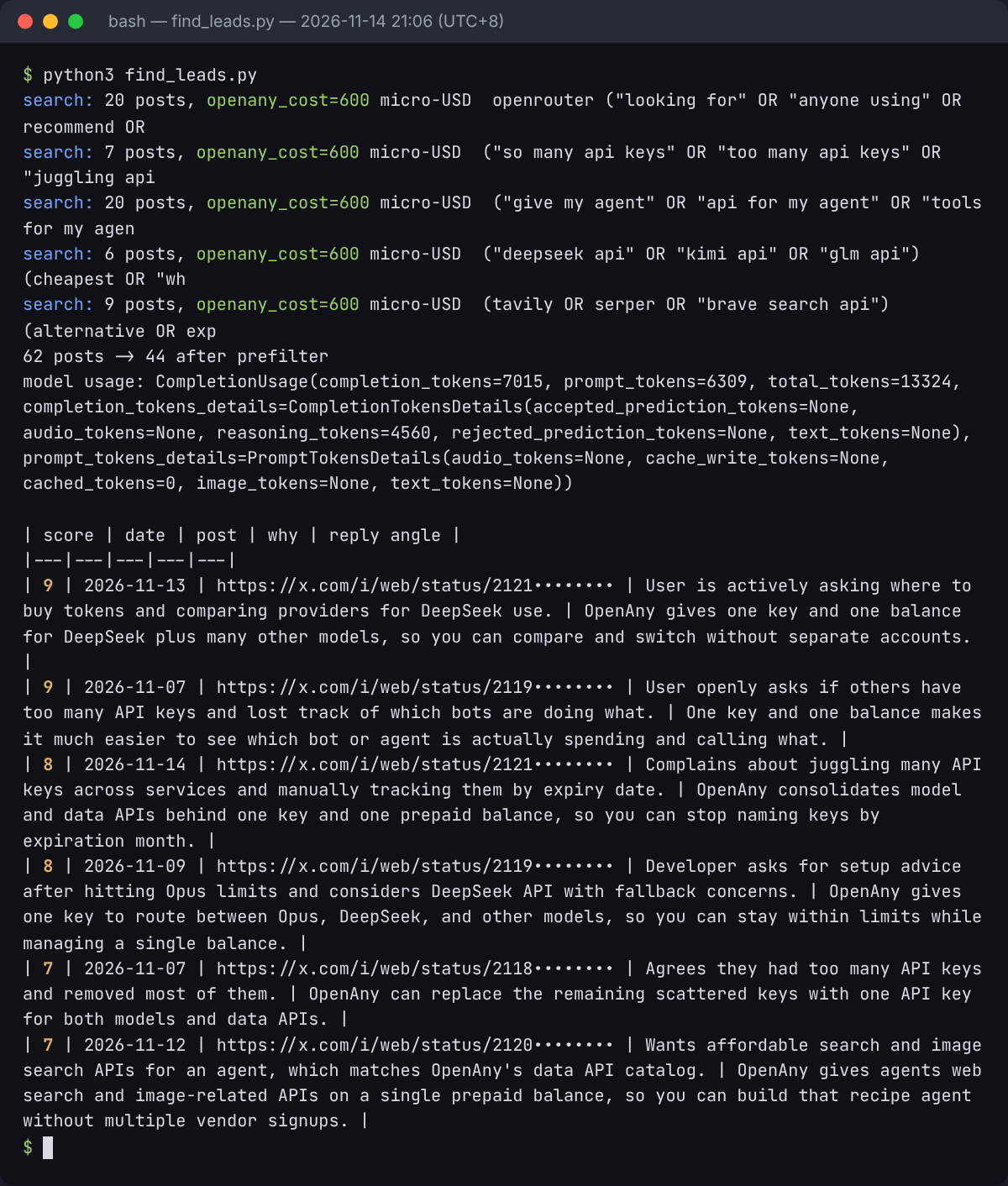
Here is what came back. Handles are hidden and post text is paraphrased, because these are real people. In your own table you'll get the actual post links.
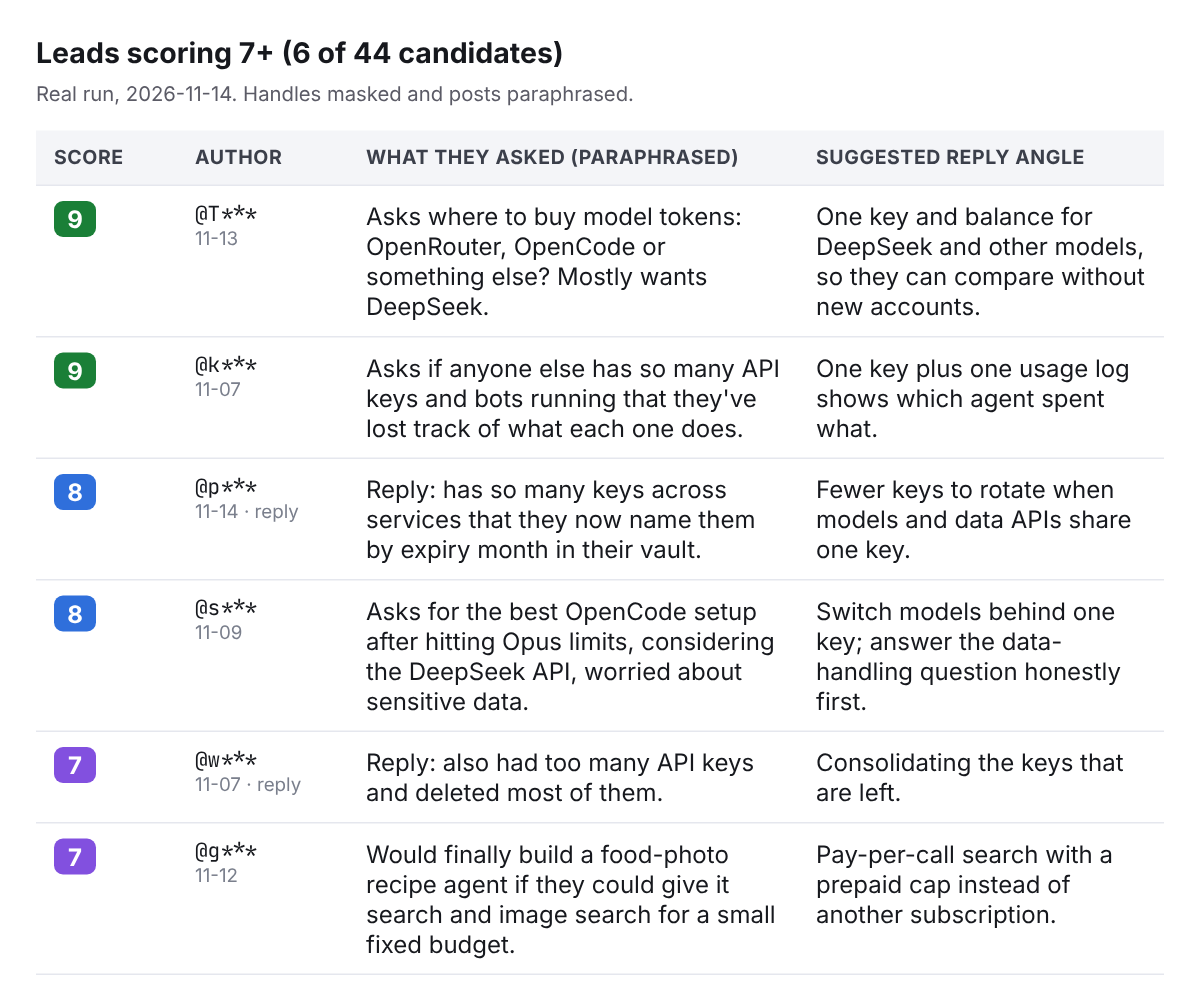
| Score | Post (paraphrased, posted Nov 7–14) | Why the model kept it | Suggested reply angle |
|---|---|---|---|
| 9 | Asks where to buy model tokens: OpenRouter, OpenCode or something else? Mostly wants DeepSeek. | Actively comparing providers for a model they already use. | One key and balance for DeepSeek and other models, so they can compare without new accounts. |
| 9 | Asks if anyone else has so many API keys and bots running that they've lost track of what each one does. | Describes key sprawl and missing visibility. | One key plus one usage log shows which agent spent what. |
| 8 | Reply: has so many keys across services that they now name them by expiry month in their vault. | Living with the exact pain, with a manual workaround. | Fewer keys to rotate when models and data APIs share one key. |
| 8 | Asks for the best OpenCode setup after hitting Opus limits, considering the DeepSeek API, worried about sensitive data. | Actively choosing a fallback model setup. | Switch models behind one key; answer the data-handling question honestly first. |
| 7 | Reply: also had too many API keys and deleted most of them. | Recent, shared frustration, weaker intent. | Consolidating the keys that are left. |
| 7 | Would finally build a food-photo recipe agent if they could give it search and image search for a fixed small budget. | Wants agent search tools and is price-sensitive. | Pay-per-call search with a prepaid cap instead of another subscription. |
Six of 44 candidates scored 7 or higher. Two more scored 5–6 and were worth a manual look: one person who had used OpenRouter for burst capacity, and one looking for a tool so their agent could parse .xlsx files. The rest were what you'd expect: vendor promos, news threads, and accounts trying to buy or resell API keys in bulk. All of those scored low, as the prompt asked.
Read every row before you reply. The model's angles are a starting point, not copy. For the OpenCode post, its suggestion skipped the author's actual worry, which was sending sensitive data to a provider. A good reply answers that first. Reply by hand, as yourself, to the people whose question you can actually help with.
What it cost
Every call drew from one prepaid balance and showed up in the same usage log (openany calls list -j), with a chargedCostMicroUsd for each call:
| Call | Count | Charged |
|---|---|---|
| X search (anyapi) | 5 | 600 micro-USD each = $0.0030 |
Intent scoring (deepseek-v4-flash, 13,324 tokens) |
1 | 12,725 micro-USD = $0.0127 |
| Total | 6 | $0.0157 |
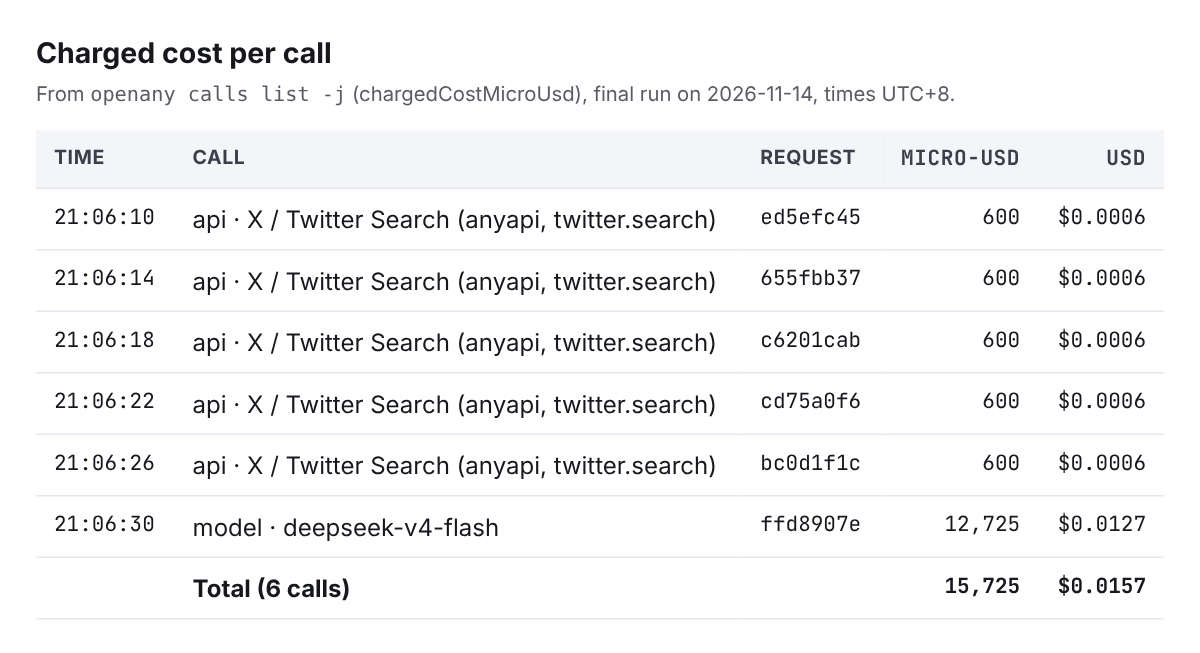
openany calls list -j, times in UTC+8.While we were tuning the queries, we also ran a dozen exploratory searches at $0.0006 each, so writing this post cost less than three cents in API calls. Model prices are per route and per token, so check the catalog for the model you pick.
Run it from Claude Code, Cursor or Codex
You don't have to write this loop yourself. With the skill installed, give your agent a bounded task:
Use the openany skill. Write and run a script that searches X for posts from the last 3 weeks where people ask for [what my product solves], drops posts with links, scores each for buying intent with a cheap model, and prints a table of post link, score, reason and reply angle. Show me the price of each API before the first call. Budget: $0.10.
Before you run it, fill in the product description. Your first queries will probably match vendors, like ours did. Ask the agent to rewrite them the way a buyer would phrase the question, and rerun. Each loop costs about a cent.
Tips from our run
- Phrase queries like the buyer. "OpenRouter alternative" found only sellers. "Where should I buy tokens" found a buyer.
- Filter links before the model. It's free, and on our run it removed most of the promos.
- Spell out what "not a lead" means. Without the vendor and key-reseller rules, those posts score surprisingly high.
- Run it on a schedule. Leads go cold in days. A daily run with
since:set to yesterday keeps the table fresh and costs about the same as this one. - Don't automate the replies. Use the table to decide who to talk to, then write each reply yourself.
FAQ
Do I need an X API plan? No. The search runs through an X search listing on OpenAny and is billed per call from your OpenAny balance.
Can I use a different model?
Yes. Any chat model in the catalog works. Swap the model ID. Reasoning models need a generous max_tokens.
Is there a free tier? No. Account and key creation are free, but calls are paid from prepaid credits.
Does this work for products other than developer tools?
The pattern does. Change PRODUCT, the queries and the low-score rules to match how your buyers talk.
Questions or a broken example? Email team@openany.si. Docs: openany.si/docs.
OpenAny is the B2A (business to agent) marketplace. Give your agent 3,200+ APIs and 168+ AI models with one key and pay-per-call pricing. openany.si