 OpenAny Blog
Your Agent's First Data API: Pick a Listing and Prepare a Sourced Wikidata Lookup
The first data API your agent should buy is one that returns a stable identifier and a source URL, not just a paragraph of text. This walkthrough uses a real public listing on OpenAny — Wikidata Entity Search — and the listing's own documented example. I fetched the public catalog and docs on 23 November 2026 (Asia/Taipei). I did not create a key for this piece, and I did not send the request.
If you only need the short version: open the listing, read the published price and required query fields, copy the official example (search=Earth), and treat id, concepturi and url as the provenance you keep. A published sample is not a completed call. A $0 price is not "no request happened."
OpenAny is the B2A (business to agent) marketplace. The public positioning is: give your agent 3,200+ APIs and 168+ AI models with one key and pay-per-call pricing. openany.si. I work on OpenAny. Sellers provide resources or execute services; OpenAny connects buyers and sellers. It does not host the seller's runtime.
The job, not the catalog
"Give my agent some data APIs" is too vague to evaluate a listing. The job in this article is narrower:
Resolve a public name to a stable Wikidata entity ID, and keep the concept URI and entity page URL as the source for later claims.
That is a lookup, not a web search, and not a research report. The agent should leave the step with an ID such as Q2 and a URI such as http://www.wikidata.org/entity/Q2, which you can cite or reuse, instead of a string that may match several different things.
Wikidata Entity Search is a fit for that job because the public contract says it searches by label or alias and returns IDs. The published sample includes id, concepturi, url, label, description and a match object. I chose this endpoint instead of another web-search or social-data example because those jobs are already covered in earlier OpenAny posts, and because the response is built around identifiers.
What the listing said on 23 November 2026
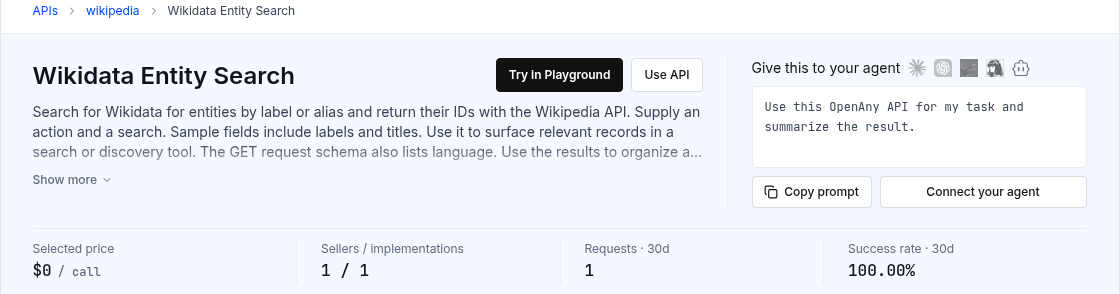
I read the public page at https://openany.si/apis/15cdfd6c-dfb8-4a80-876a-9e38fb73d163/ the same day I wrote this. The facts below are from that page, not from a call I made.
- Title: Wikidata Entity Search
- Provider on the listing:
wikimedia - Method and path:
GET https://api.openany.si/v1/agent-apis/wikimedia/wikidata/entity-search - Selected / listed price: $0 / call
- Authentication on the documented cURL:
Authorization: Bearer $OPENANY_API_KEY - Playground warning, quoted from the page: "Run sends a real API request. Charges follow the published API contract."
- The sample response is labeled as a documented HTTP 200 and as a "Published documentation example. Verify the actual response after an approved call."
- The API Markdown on the same page listed contract revision: 4
- The 30-day request and success-rate fields on the page showed placeholders or "Loading..." when I fetched it. I am not going to invent volume or latency numbers.
The wikimedia seller page the same day listed this endpoint among 19 Wikipedia-collection APIs, also at $0 / call, with no request body.
A published $0 rate is still a rate. It can change. It does not mean the endpoint is unauthenticated. The documented request still uses your OpenAny key. Copying the example, opening Playground, or using a pricing calculator does not send that request; clicking Run in a signed-in Playground, or actually calling the path, does.
Eligible new OpenAny accounts can receive $0.50 in signup credits toward supported balance calls, according to the pricing page I read the same day. That credit is not a claim that this Wikidata route will always be free, and it is not a receipt for this article.
Required inputs, copied from the listing
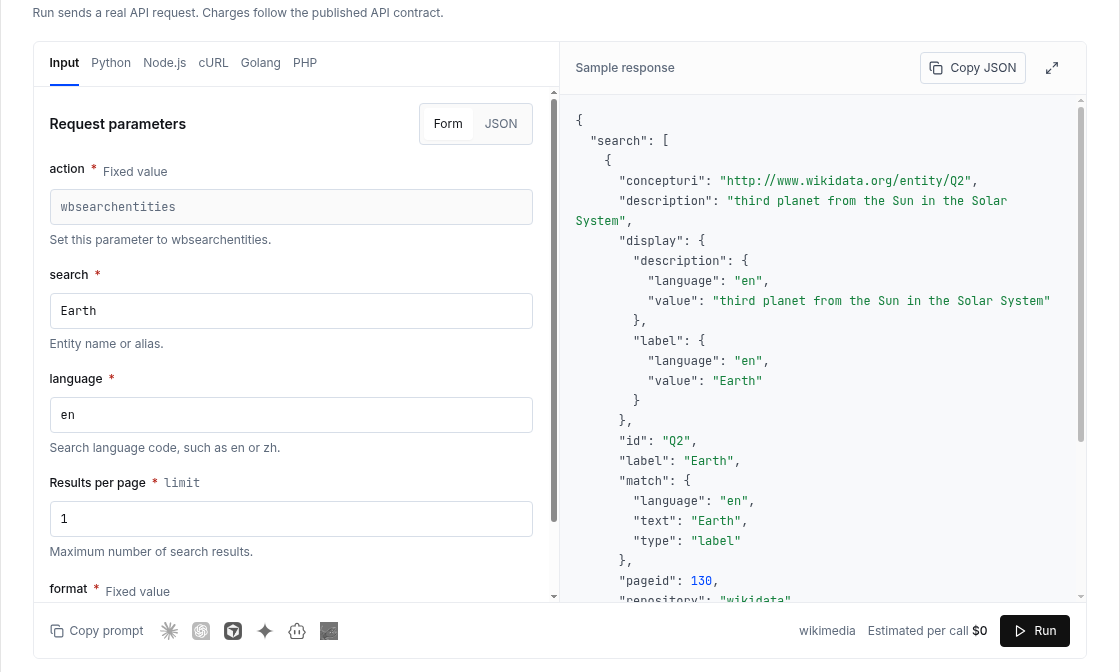
All five query parameters are required in the listing schema:
| Parameter | Location | Required | What the listing says |
|---|---|---|---|
action |
query | Yes | Set to wbsearchentities |
search |
query | Yes | Entity name or alias |
language |
query | Yes | Search language code, such as en or zh |
limit |
query | Yes | Maximum number of results; minimum 1, maximum 20 |
format |
query | Yes | Set to json |
The listing also notes that fields are those shown on the page, and that additional options and input encoding can vary by provider. Required markers inside a nested object apply when that object is used.
This is the documented example request, including the listing's own search=Earth value. I did not execute it.
curl \
  'https://api.openany.si/v1/agent-apis/wikimedia/wikidata/entity-search?action=wbsearchentities&format=json&language=en&limit=1&search=Earth' \
  -X GET \
  -H "Authorization: Bearer $OPENANY_API_KEY" \
  -H 'Content-Type: application/json'
Keep the key in the process environment or a secret store. Do not paste a live key into a prompt, a ticket, or a blog post.
What the published sample says you should keep as the source
The listing's documented example is a search for Earth with limit=1. The published sample response includes one hit. The fields that matter for provenance are:
id:Q2concepturi:http://www.wikidata.org/entity/Q2url://www.wikidata.org/wiki/Q2label:Earthdescription:third planet from the Sun in the Solar Systemmatch.type:label(the sample matched the label, not some other alias type)searchinfo.search:Earthsuccess:1search-continue:1
That last field is easy to miss. A search-continue value of 1 in the example means the listing's own sample is not claiming that Q2 is the only possible match in Wikidata. If you later raise limit, or follow a continue token the provider actually returns, you may see other entities. The first row is a candidate, not a verdict.
After a real approved call — which this article does not include — you should still check two things the sample cannot prove: whether the HTTP status was 2xx, and whether the account's usage record shows the request. The listing tells you to verify the actual response after an approved call. Even at a published $0 rate, a usage record is how you confirm that a request happened.
If you want to look up a company or a product instead of Earth, change only the search value (and language if you need it) and keep the other required fields. I am not going to invent a response for a name I did not look up. The trustworthy pattern is: send one authorized request, compare the description and match against the name you meant, then store id and concepturi. If two good candidates appear, do not let the agent pick silently; keep both IDs and ask.

How this fits an agent, without repeating the setup guide
You can read this listing without signing in. Connecting an agent so it can execute the path is a separate step. OpenAny documents more than one connection path; the public docs I read the same day include:
- The Skill and CLI path, starting from https://openany.si/SKILL.md
- The remote MCP server
https://mcp.openany.si/over Streamable HTTP. Public tool discovery needs no key. Executing a resource needs your OpenAny key and spending authorization. The docs also say client-specific paid calls have not been verified on that page, and that the MCP server does not use OAuth. - Direct HTTP to
https://api.openany.si/v1, which is the shape of the cURL above
Installing a skill, listing MCP tools, or copying cURL is discovery. run_api, a signed-in Playground Run, or a real HTTP request can be execution. That boundary is the subject of Discovery Is Not Execution. This article does not replace it.
For this lookup, a reasonable agent procedure is:
- Name the entity you want resolved, in one language.
- Read the current listing: price, required fields, contract revision.
- Send one authorized request with a small
limit. - Keep
id,concepturi,urlanddescriptionin the notes the agent will cite later. - If the description does not match the thing you meant, do not continue as if it did.
A portable skill that tells the agent how to do those steps still runs in your agent. It is not the Wikidata service, and OpenAny is not hosting Wikimedia's runtime.
What this walkthrough does not prove
- It does not prove that the example request succeeds today from your account.
- It does not measure latency, success rate, or freshness of Wikidata data.
- It does not mean every Wikimedia listing will stay at $0 / call.
- It does not authorize spending, even when the published rate is $0.
- The homepage FAQ, as of 20 November 2026, also published catalog counts of 159 models, 4,469 API endpoints and 75 provider identities, and said those numbers describe listings, not runtime verification. This article keeps the marketing line 3,200+ APIs and 168+ models, and treats those FAQ figures as dated listing counts, not as a live test of this endpoint.
If you later run the documented example with an authorized key, the honest next sentence is a usage record and the response you actually received, dated. Until then, the right status is the one the docs already use: configured, or prepared from the public contract; live verification pending.
FAQ
Is a $0 / call API free to inspect?
Yes, you can read the public listing, schema and sample without paying. Sending the documented request is a real API request and uses the published contract. I did not send one here.
Can I use this without an OpenAny key?
The documented endpoint uses Authorization: Bearer $OPENANY_API_KEY. Public discovery of the catalog, and public MCP tool listing, are described separately in the docs. Do not assume a missing header still works.
Why start with Wikidata instead of a paid search API?
Because the first buyer habit worth teaching is "keep an identifier and a source," and this listing's published sample already shows those fields. A later paid search API can build on a resolved ID. I am not ranking this as the best API in the catalog.
What should I do after an approved call?
Inspect the response against the name you searched, store the entity ID and URI, and check the usage record. Then stop or continue with a clear next job. Do not retry blindly if the first request's result is uncertain.
The next step, if you want one, is to open the Wikidata Entity Search listing, reread the price and schema on the day you call it, and run one authorized example only after you accept that it is a real request.